Elevate Your Surface Patterns with a Realistic Square Pillow Mockup
As a surface pattern designer, you know that a beautiful motif on a digital canvas is only half the battle. The real challenge is helping your clients, or your own audience, visualize that pattern in a tangible, real-world setting. This is where a high-quality mockup transforms from a simple tool into a crucial piece of your design assets. The Square Pillow Interior Pattern Mockup is built for exactly this purpose, offering a pristine, contemporary stage to let your textile designs shine without distraction.
The Anatomy of a Professional Presentation
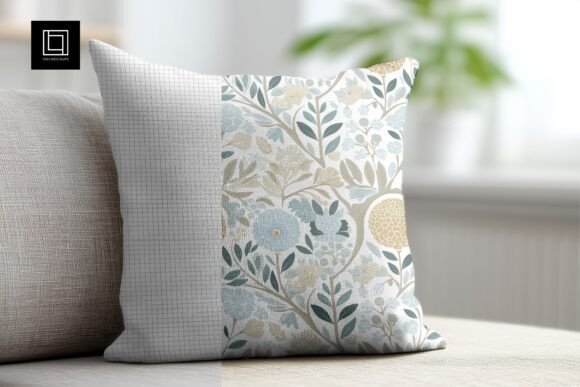
This isn't just a flat image of a pillow. The mockup is crafted to mimic a studio photograph, placing a square pillow in a bright white contemporary home interior. The environment is intentionally minimalist—think clean lines, soft natural light, and neutral tones. This setting is strategic; it ensures that your surface patterns and textile designs are the undisputed star of the show. The pillow itself features a realistic fabric texture, a subtle but vital detail that adds depth and authenticity to your final presentation. Without that textural nuance, even the most intricate pattern can look digitally pasted on.
The true power of this premium mockup lies in its flexibility, delivered through a fully editable PSD file. Using smart object integration, you can place your design onto the pillow with a simple drag-and-drop. But it goes further. The file includes adjustable highlights and shadows. This is a game-changer. Whether you're showcasing a delicate, light-colored floral or a bold, dark geometric, you can fine-tune the lighting to ensure your pattern looks natural and integrated, not flat or overly contrasted. The customizable background also allows you to shift the surrounding color to better complement the mood of your specific design, offering a cohesive final image for your portfolio or client presentation.
Beyond the Pillow: Strategic Applications for Designers and Brands
While its primary function is clear, the utility of this mockup extends across multiple facets of a creative business. For the surface pattern designer, it’s the perfect tool for building a cohesive portfolio that speaks directly to product-based clients. Instead of showing a repeating tile, you show the pattern as it would live on a throw pillow in a stylish living room. This immediately elevates the perceived value of your work.
For small business owners and entrepreneurs in the home décor or textile space, this mockup is a cornerstone for marketing and brand identity. Use it to create compelling social media graphics, website banners, or even digital lookbooks. It provides a consistent, professional visual language that builds brand recognition. A publisher or blogger focusing on interior design or DIY crafts can use it to illustrate articles about styling tips or trend forecasts, adding a layer of professional design credibility to their content.
Consider the power of visual hierarchy in your marketing materials. By placing your pattern on this mockup, you create a clear focal point. The clean interior context guides the viewer's eye directly to your design, improving readability of the pattern itself and audience engagement with the final image. It’s a subtle form of modern typography for your visuals—using the mockup as the typeface that frames and presents your core message (your pattern).
Practical Guidance for Seamless Integration
Getting the most out of the Square Pillow Interior Pattern Mockup requires a bit of thoughtful preparation. First, evaluate your project fit. The mockup’s bright, airy style is ideal for patterns with a contemporary, Scandinavian, or minimalist aesthetic. If your design is more rustic or heavily textured, you might need to leverage the background customization heavily to set the right mood.
Test your pattern’s scale and complexity before committing. A very large-scale, complex pattern might lose some detail on the pillow's folds, while a simple, small-scale repeat could look perfect. Use the smart object to quickly swap and compare different designs. Pay close attention to the adjustable shadows and highlights; a quick tweak can make a dark navy pattern look rich and velvety, or a pastel design look soft and inviting.
Remember, this is a ready-made mockup for immediate use, but custom needs are always a conversation away. The included layered PSD file is compatible with both Adobe Photoshop and the free alternative Photopea, making it accessible. While the mockup provides the perfect stage, your pattern is the performer. Ensure your final exported image is high-resolution (the file’s 6000×4000 pixels ensure it’s studio-quality) for crisp use in both digital and print applications, from online shops to client PDF proposals.
Ultimately, tools like this are about building a bridge between your digital creation and the client’s imagination. By presenting your work within a recognizable, desirable context, you’re not just selling a pattern; you’re selling a lifestyle, a feeling, and a solution. That’s the hallmark of a professional and strategic creative practice.